Use a Shopify revenue checker to prioritize stores, products, and competitors for deeper research.
Shopify revenue checker
Shopify revenue checker workflow for competitor store research
The short version: a Shopify revenue checker should help you prioritize stores and products, not pretend to know exact private revenue. Use directional store signals, product activity, ad evidence, and margin checks before treating any estimate as a product decision.
Workflow guide based on public ecommerce research practice and Winning Hunter store-tracking positioning. External revenue estimates should be treated as directional unless verified by the merchant.
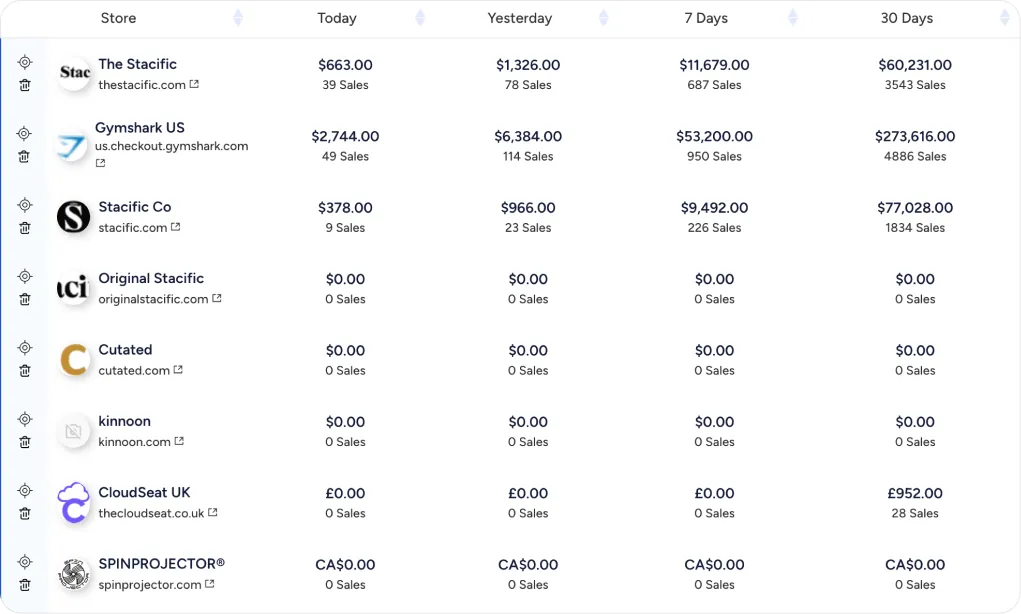
No external Shopify revenue checker should be treated as exact merchant sales proof.
Pair revenue estimates with ads, product economics, and store tracking before copying an idea.
STORE RESEARCH
What a Shopify revenue checker can and cannot prove
The useful question is not exact revenue. It is whether store signals are strong enough to justify deeper product validation.
Estimate momentum
Look for product activity, best-seller movement, ad signals, reviews, traffic clues, and store freshness.
Avoid exact revenue claims
External estimates can be wrong. Use them for prioritization, not for reporting competitor revenue as fact.
Check multiple inputs
A better workflow combines store tracker output with ad research, product economics, and supplier reality.
Reject weak economics
If a product has weak margin or risky fulfillment, a high estimated revenue signal is not enough.
SHOPIFY REVENUE CHECKER NOTES
Shopify revenue research notes before you copy a store
These notes keep the store-estimation workflow tied to decision quality, not vanity estimates.
- Store fit Use it when store momentum affects your shortlist.
- Estimate warning Do not treat estimates as proof of exact merchant revenue.
- Buyer profile The strongest user validates competitors before sourcing.
- Use case A useful workflow helps prioritize stores and products.
- Pricing check Check tool limits before choosing a workflow.
- Next step After an estimate, inspect ads, price, and margins.
- Caution Treat numbers as research signals, not confirmed sales.
Start with directional revenue signals
A Shopify revenue checker can help rank which stores deserve attention. It should not be the only reason to copy a product, because estimated revenue can be distorted by traffic, refunds, discounts, ad spend, or data gaps.
Check store and product evidence
Look at best sellers, product-page freshness, reviews, price changes, collection structure, shipping promise, and visible ad activity. A real product decision needs more than one store metric.
Connect revenue estimates to ad activity
Revenue direction matters more when active ads support the same product or offer. If a store appears strong but has no visible acquisition signal, treat the estimate with caution.
Use target CPA before copying
Even if a competitor appears to sell well, your economics may be worse. Product cost, shipping, refunds, creative production, and CPA determine whether the idea can survive.
Final recommendation
Use a Shopify revenue checker as a prioritization tool. Combine it with store tracking, adspy research, and margin modeling before adding a product to your test list.
Sources checked Key public pages used for Shopify Revenue Checker Recheck live pages before using this Shopify Revenue Checker guide to buy.
FAQ
Common Shopify revenue checker questions
Can a Shopify revenue checker show exact revenue?
External Shopify revenue checker tools should be treated as directional unless the merchant provides verified sales data. Use estimates to prioritize research.
What is a Shopify revenue checker useful for?
A Shopify revenue checker is useful for ranking competitor stores, spotting product momentum, and deciding which stores deserve deeper analysis.
How do I estimate Shopify store revenue?
Combine store activity, product movement, best sellers, review volume, visible ads, traffic clues, and pricing. Avoid treating one estimate as final.
Is a Shopify revenue checker better than a store tracker?
A store tracker is useful for ongoing monitoring. A Shopify revenue checker is useful when the decision is whether a store or product deserves attention now.
Can Winning Hunter help with Shopify revenue research?
Winning Hunter can be compared when you want store tracking plus ad and product validation. Confirm current store-tracking limits before subscribing.
What should I do after finding a high-revenue store?
Inspect the products, ads, margins, fulfillment risk, reviews, and competitor density before copying anything.
RELATED GUIDES
Read next after Shopify Revenue Checker
Use the next page to answer the closest follow-up question after this Shopify Revenue Checker guide.
Shopify Revenue Checker: next step
Use this Shopify Revenue Checker guide to choose the next check, then verify current product details on the live Winning Hunter site.
Shopify Revenue Checker decision
Open Winning Hunter
Use a Shopify revenue checker as a prioritization tool. Combine it with store tracking, adspy research, and margin modeling before adding a product to your test list.