Watch competitor store behavior over time: products, offers, ad activity, and category focus.
Store tracker workflow
Winning Hunter Store Tracker for competitor store monitoring
Use Store Tracker when the question is not exact revenue, but whether a competitor store is still active, changing products, testing offers, and supporting the same ad angles over time.
This page owns competitor store tracker intent. The Shopify Sales Tracker page owns sales, revenue, and estimator intent.
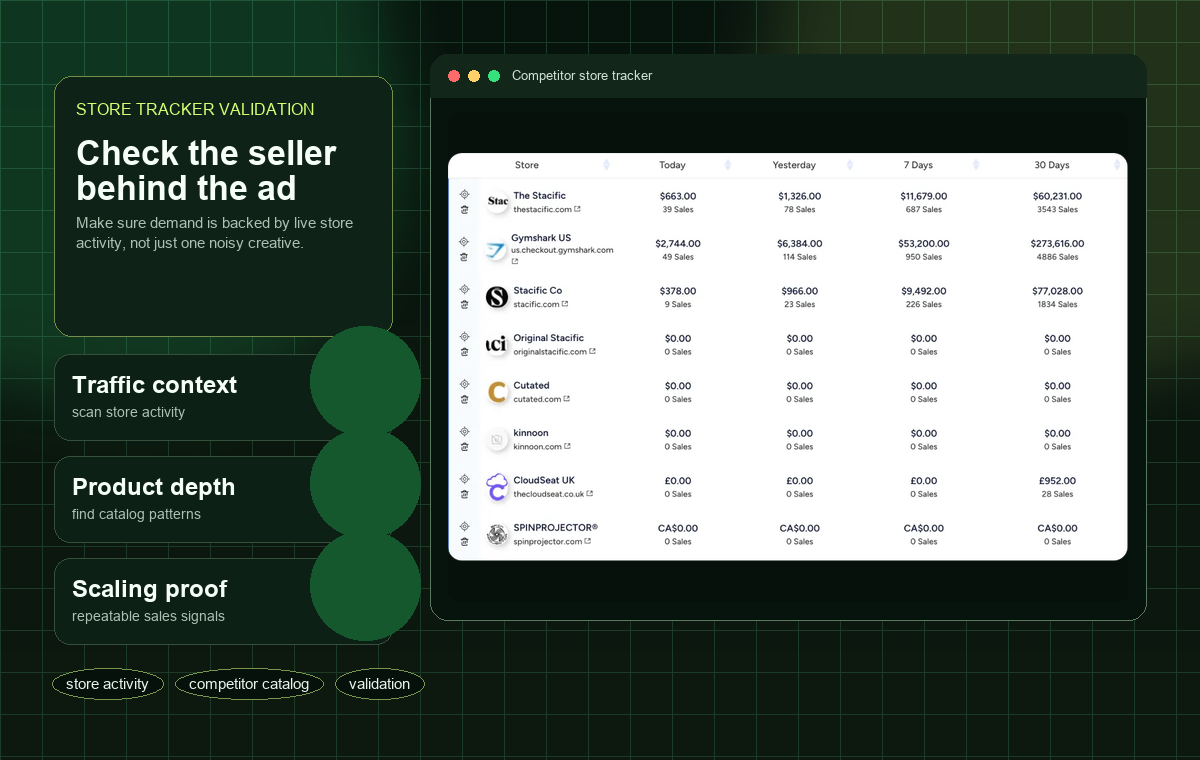
Use Shopify Sales Tracker when the main query is sales, revenue, or estimator accuracy.
Operators who already have competitor stores or product angles and need ongoing monitoring.
STORE MONITORING
What Store Tracker should prove before you copy a competitor
A competitor store is useful evidence only when it shows repeatable activity. These checks make the page distinct from the Shopify sales-estimator page.
Watch what gets added or removed
New products, bundles, and landing pages show where a store is testing. One old product page is weaker evidence.
Track pricing and bundle changes
If a store keeps changing discounts, bundles, or shipping promises, it may still be searching for a working offer.
Match store pages to ad activity
A product page is more useful when recent ads point to it or similar offers appear across the store.
Check weekly, not once
Store tracking is strongest as a watchlist habit. A single snapshot can miss whether a product is rising, fading, or being replaced.
Use Store Tracker for watchlists
Build a small watchlist of competitor stores by niche, country, or product angle. Recheck them weekly for new products, changed landing pages, new bundles, and whether the store is still pushing the same category.
Do not treat store activity as confirmed sales
Store activity can show that a competitor is testing or maintaining an offer. It does not prove exact profit. Treat product changes, repeated ads, and page quality as directional signals before moving to supplier and margin checks.
When to use the Shopify Sales Tracker page instead
If your question is revenue, sales estimates, or whether sales tracker data is accurate, use the Shopify Sales Tracker page. Store Tracker is better for competitor monitoring and product-change research.
A simple weekly monitoring routine
Create a watchlist with 10 to 20 competitor stores. Each week, record new products, removed products, changed offers, repeated ad angles, and pages that appear to receive more attention. The value comes from observing change over time, not from one screenshot.
What would make a store worth watching
Prioritize stores that have a focused niche, active product pages, recent ads, and visible offer testing. Skip abandoned-looking stores, copied catalog dumps, and stores where the product page does not match the ad promise.
What to record in a competitor watchlist
Track store name, niche, country, product angle, first-seen date, latest product change, collection changes, price movement, bundle changes, landing-page edits, ad connection, and whether the store is still active. The watchlist is a monitoring log, not a revenue spreadsheet.
Signals that deserve a follow-up
A store deserves another check when it adds a focused collection, rewrites the offer, changes the hero product, repeats a creative angle, adjusts bundles, or moves a product into a more prominent store position. Those changes suggest active testing.
Store-monitoring mistakes
Do not fill the watchlist with every store you find. Too many low-quality stores hide the useful changes. Remove stores with no recent edits, no clear niche, no active offer, no ad connection, or pages that look copied without market-specific positioning.
Agency use case
For an agency, Store Tracker is useful before a client strategy call. Bring three competitor stores, recent changes, ad angles, offer notes, and a recommendation for what the client should test, improve, or avoid next.
FAQ
Common questions about store tracker
What is a store tracker?
A store tracker helps you inspect competitor ecommerce stores, product pages, and market signals so you can validate whether a product idea has real momentum.
Can I track Shopify competitors with Winning Hunter?
Winning Hunter is positioned around ad and store research, so it can help evaluate competitor stores connected to ecommerce product trends.
Why track stores after finding an ad?
Ads show creative demand, but store tracking shows whether sellers are building real offers around the product. Both signals together make validation stronger.
What store signals matter most?
Look for active product pages, consistent offers, repeated creative testing, related products, and signs that the store is not abandoned.
Is Store Tracker the same as Shopify Sales Tracker?
No. Store Tracker is for competitor monitoring and product-change research. Shopify Sales Tracker is for sales, revenue, and estimator questions.
Is store tracking useful for agencies?
Yes. Agencies can use store tracking to prepare competitor research, creative angles, and market context before proposing product or ad tests.
RELATED GUIDES
Read next after Store Tracker
Use the next page to answer the closest follow-up question after this Store Tracker guide.
Store Tracker: next step
Use this Store Tracker guide to choose the next check, then verify current product details on the live Winning Hunter site.
Store Tracker decision
Open Winning Hunter
For an agency, Store Tracker is useful before a client strategy call. Bring three competitor stores, recent changes, ad angles, offer notes, and a recommendation for what the client should test, improve, or avoid next.