Estimate whether a competitor store or product deserves deeper research.
Shopify sales tracker guide
Shopify sales tracker signals: what you can and cannot trust
A Shopify sales tracker is useful for ranking competitor opportunities, but it should not be treated as a merchant's verified backend revenue. Use sales and revenue clues as direction, then confirm demand with ads, store activity, and margin math.
This page owns Shopify sales tracker, revenue checker, sales estimator, and sales accuracy intent.
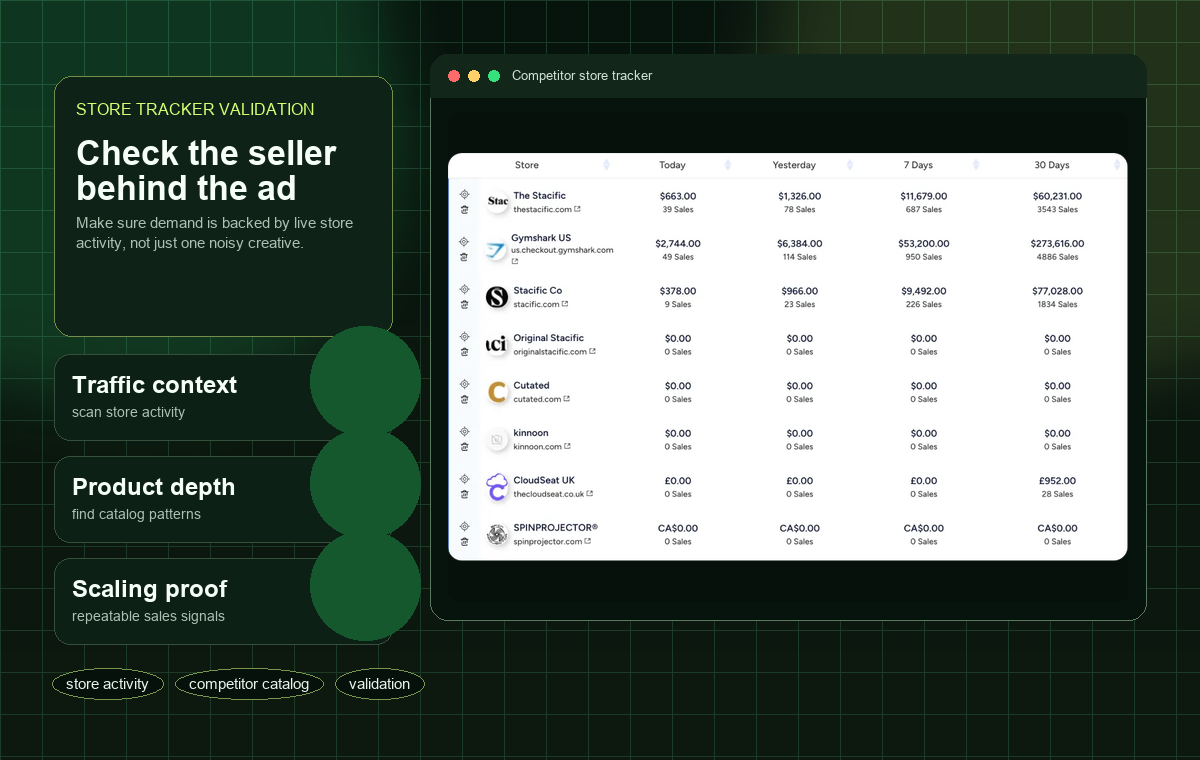
External tools usually provide directional estimates, not confirmed Shopify backend sales.
Use estimates to prioritize products, then verify with ads, store changes, supplier cost, and margins.
SALES ESTIMATE CHECKS
How to use Shopify sales signals without overtrusting them
Sales tracker pages often sound more precise than they are. These checks keep the page focused on accuracy, limitations, and practical use.
Look for direction, not exact dollars
A rising or steady trend is more useful than a single revenue number. Treat the number as a prioritization signal.
Find which product deserves a second look
Use sales clues to decide which product pages to inspect first, then compare them against ad activity and offer quality.
Private sales are hard to verify externally
Unless a tool explains a verified data source, assume competitor sales are modeled or inferred.
Turn estimates into a yes/no checklist
A product moves forward only if sales clues, recent ads, store activity, and margin math all support the same decision.
What a Shopify sales tracker can actually do
The useful output of a sales tracker is prioritization. A tracker can help you decide which stores, products, or offers deserve attention first. It should not be the only reason you copy a product or assume a competitor is profitable.
Sales Tracker, Revenue Checker, and Store Tracker are different jobs
Use a Shopify sales tracker for sales signals, revenue estimates, and accuracy questions. Use Shopify Revenue Checker for the step-by-step process of estimating a store's direction. Use Store Tracker for ongoing competitor changes such as products, offers, and landing pages. Keeping these jobs separate prevents one number from carrying more certainty than it deserves.
How to judge sales accuracy
Ask whether the sales tracker number agrees with visible evidence: active ads, current product pages, repeat offers, store category focus, reviews, traffic clues, and pricing. If the estimate looks high but the store appears inactive, treat it as weak evidence.
When PPSPY or ShopHunter may be the better comparison
If the whole job is Shopify sales estimation, compare Winning Hunter with dedicated Shopify tracking tools such as PPSPY or ShopHunter. If you also need TikTok ads, Meta ads, and product validation, Winning Hunter remains a broader shortlist.
A practical accuracy scale
Treat sales tracker output in three levels: high confidence when revenue direction matches ads and store changes, medium confidence when only one signal supports it, and low confidence when the number conflicts with visible store activity.
How to use estimates in a product test
Use sales estimates to decide where to spend research time, not to set your launch budget directly. A product still needs landed cost, gross margin, target CPA, creative angle, and supplier checks before paid traffic makes sense.
Revenue estimate inputs to sanity-check
Before trusting a sales estimate, sanity-check average order value, traffic plausibility, conversion-rate assumptions, product price, review velocity, discounting, stock signals, and whether ads are still sending buyers to the same product page.
Turn sales clues into test economics
The next step after a promising sales clue is not copying the product. Estimate landed cost, gross margin, break-even CPA, target CPA, break-even ROAS, refund risk, shipping window, and the smallest test budget that could produce a useful decision.
When an estimate is misleading
A sales estimate can look strong when the store has high traffic but poor conversion, many low-margin orders, heavy discounting, subscription products, wholesale traffic, or one temporary campaign spike. Revenue direction is useful only when the economics still make sense.
How to compare sales tracker tools
Compare Shopify tracker tools by historical depth, store limits, product limits, export access, Chrome extension workflow, data explanation, and whether the tool helps you move from estimated revenue to a practical test decision.
Sources checked Key public pages used for Sales Tracker Recheck live pages before using this Sales Tracker guide to buy.
FAQ
Common Shopify sales tracker questions
What is a Shopify sales tracker?
A Shopify sales tracker helps researchers inspect competitor store signals, product activity, and possible momentum. Exact private sales should not be assumed unless a tool officially supports that data.
Can Winning Hunter track Shopify stores?
Winning Hunter is positioned around ad and store research, so it can help evaluate ecommerce stores connected to product and ad trends.
Is there a free Shopify sales tracker?
Free tools may provide limited public signals. For serious product validation, compare coverage, freshness, store context, and workflow limits before relying on any free option.
Can I estimate Shopify store revenue from public signals?
You can use signals such as product activity, ads, offers, and store changes to form an estimate, but exact revenue should be treated cautiously unless verified by an official source.
Is Shopify sales tracker data accurate?
It can be useful directionally, but exact accuracy depends on the tool's data source and model. Use it with ad, store, product-page, and margin checks.
Should I use this page or the store tracker page?
Use this page for Shopify sales and revenue-checker intent. Use the store tracker page for the broader competitor store research workflow.
Should I use a Shopify sales tracker or Shopify Revenue Checker?
Use a Shopify sales tracker when you need to understand sales signals and accuracy limits. Use Shopify Revenue Checker when you need a repeatable store-estimation workflow.
RELATED GUIDES
Read next after Sales Tracker
Use the next page to answer the closest follow-up question after this Sales Tracker guide.
Sales Tracker: next step
Use this Sales Tracker guide to choose the next check, then verify current product details on the live Winning Hunter site.
Sales Tracker decision
Open Winning Hunter
Compare Shopify tracker tools by historical depth, store limits, product limits, export access, Chrome extension workflow, data explanation, and whether the tool helps you move from estimated revenue to a practical test decision.